MCP vs. API Integrations for Non-Technical App Builders
MCP simplifies how AI agents find and use external tools compared to traditional APIs.
The rule of thumb here doesn't budge: 85% of new applications are projected to run on no-code or low-code platforms by 2030, up from around 70% in 2025 and less than 25% in 2020. And yet most people who try to build something real still slam into the same wall the moment their app needs to talk to another service. That wall is the API integration layer. MCP is the first thing that's actually taken it down, and anyone still treating it as a nice-to-have hasn't looked at who just bet their infrastructure on it.
What MCP is and why it emerged when it did
Anthropic built an open protocol for connecting AI models to external tools and data in late 2024. Then, in December 2025, it handed the whole thing to the Agentic AI Foundation, a body under the Linux Foundation that Anthropic co-founded alongside Block and OpenAI. MCP stopped being one company's proprietary interface and became a shared standard, the kind nobody owns and everybody has to play nice with.
OpenAI, Google, Microsoft, and 143 other organizations joined the AAIF to help govern the protocol. When that many competitors agree to share a rulebook, that's not a bet on a feature. That's infrastructure, full stop.
OpenAI backed it up with action: it announced the deprecation of its proprietary Assistants API. In August 2025 it announced the deprecation of its proprietary Assistants API, with a full shutdown scheduled for August 26, 2026, and built MCP support directly into the Responses API that replaced it. A company retiring its own technology in favor of a shared standard is about as concrete a commitment as this industry offers.
The scale bears it out too. By March 2026, SDKs tied to the protocol were pulling in 97 million monthly downloads, and public registries listed over 20,000 servers. Claude, ChatGPT, Cursor, Microsoft Copilot, and VS Code all support MCP natively now. Gemini supports it as well, though only in the developer API, SDK, and enterprise agent platform so far, not in the consumer app or Workspace products.
A REST API works like a USB port for your code: a standard socket it plugs into. MCP is the USB port for the AI itself. An agent connected to an MCP server can ask, in effect, "what tools do you have?", get back a structured list, and pick the right one based on what the user actually asked for. Nobody writes glue code to make that happen. That's the entire point.
MCP breaks into three building blocks. Resources are read-only data the agent can pull from. Tools are actions the agent can take, the kind that change something. Prompts are reusable instruction templates. None of it requires a computer science degree to follow.
Timing matters here too. MCP landed right as "vibe coding," Andrej Karpathy's February 2025 term for fully AI-driven building, pulled non-coders into building production apps for the first time. The protocol and the movement fed off each other: one gave people the confidence to build without code, the other gave them a way to connect what they built to the outside world.
The core difference between MCP and a traditional API, without the jargon
APIs are for your code. MCP is for your AI. That's the whole distinction, stripped down.
Picture the old way first. You want your app to check the price of something on another service. You write code, look up the exact endpoint in the documentation, and parse whatever comes back in the response. Every decision along the way belongs to you, or to your developer.
Now picture the MCP way. Type into Claude: "how much does Figma cost?" Claude sees it has a tool that can answer that, calls it, and hands you the number. Zero lines of code changed hands.
The contrast holds across the whole stack. With an API, a developer reads documentation and writes code to discover what's possible; with MCP, the AI reads tool descriptions on its own, right when it needs them. With an API, application code does the calling; with MCP, the AI model itself does it. API parameters get hardcoded by whoever wrote the integration, while MCP lets the AI adjust parameters based on what the user actually meant, in plain language. And when something breaks, an API leans on the developer's error-handling code, while MCP either reasons its way through the failure or just asks the user a follow-up question.
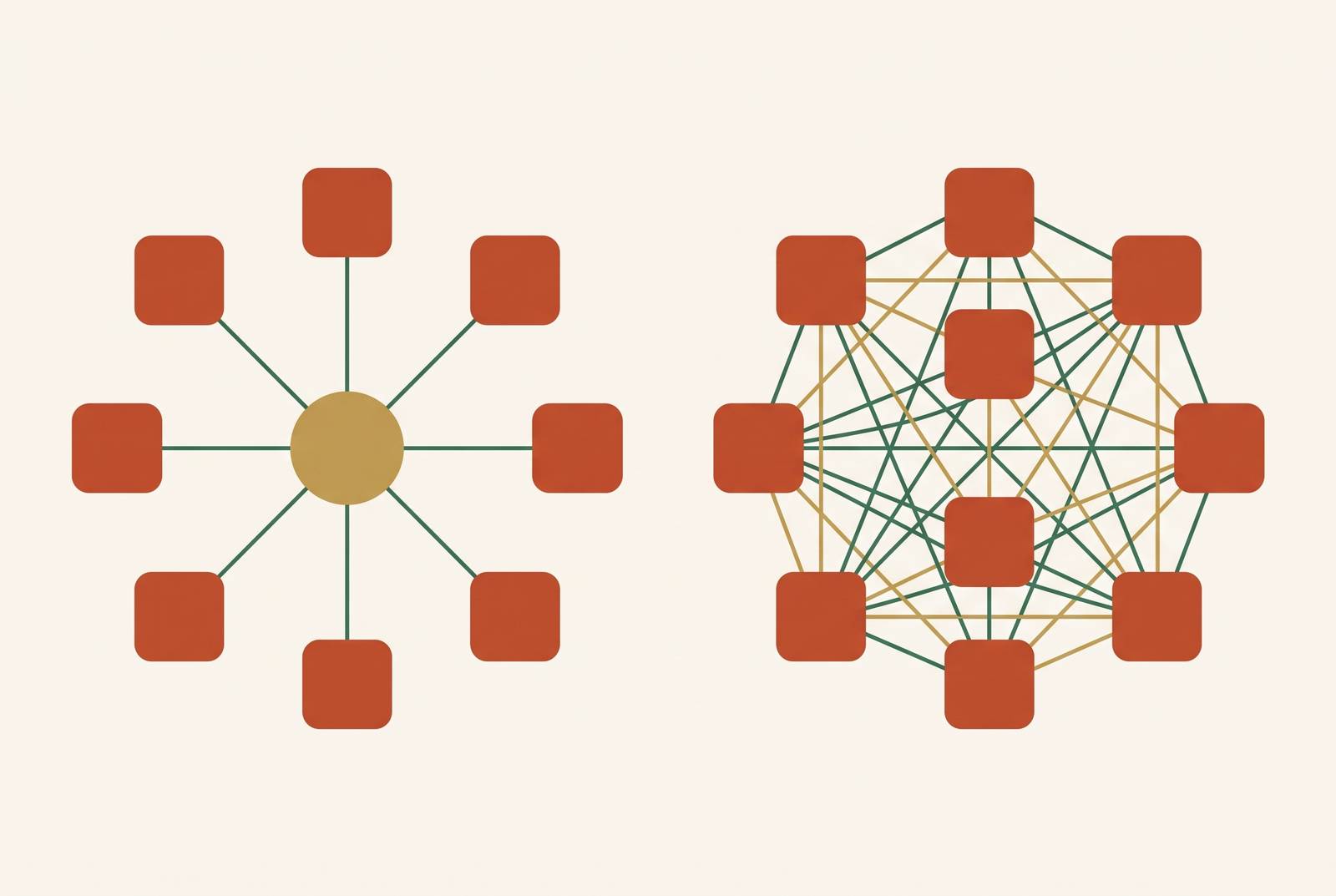
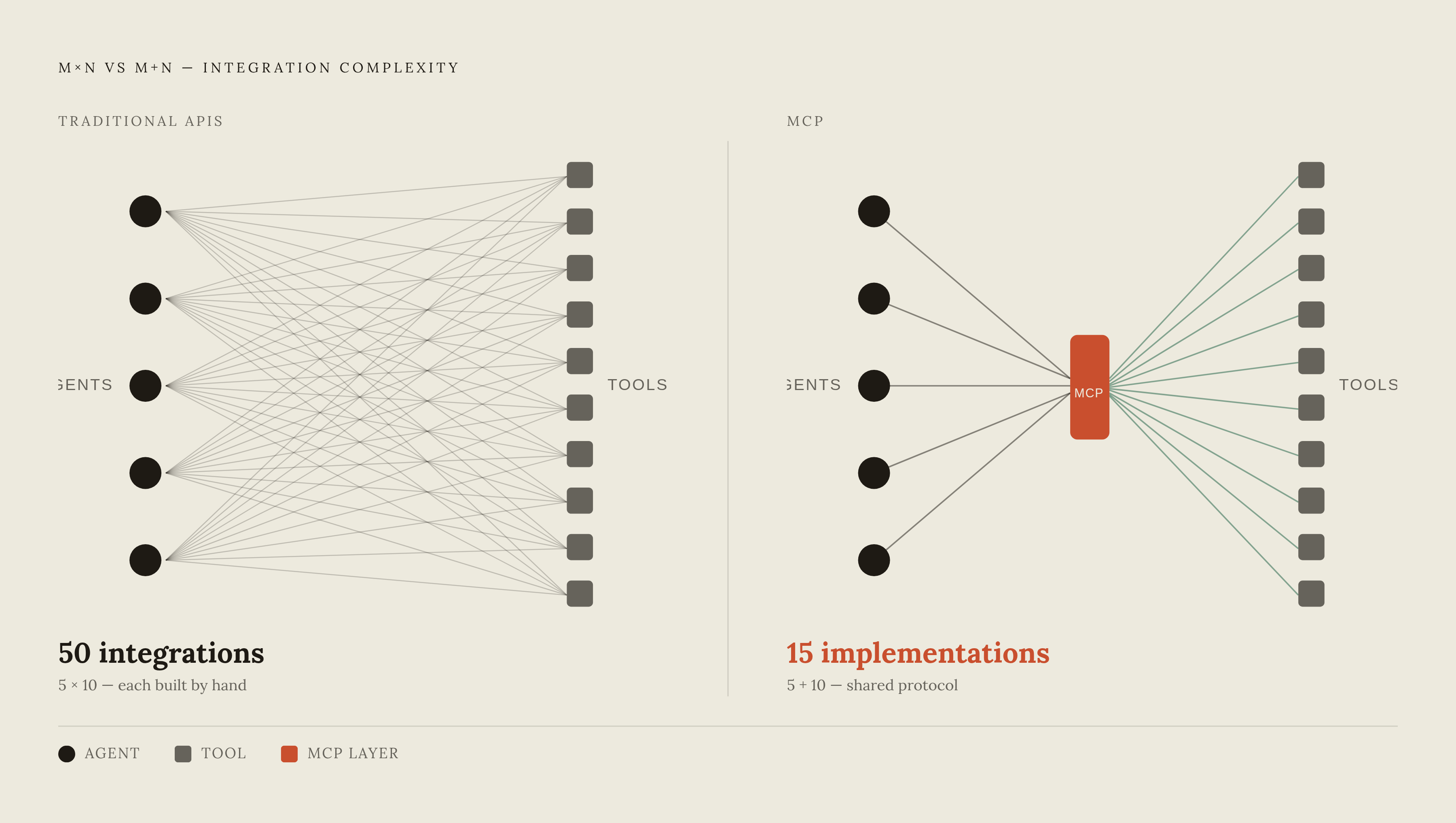
The numbers argument is the strongest case for taking MCP seriously, because it explains why the thing scales differently. Connect every AI agent to every tool directly through APIs and you get custom code for each pairing, what's usually called an M×N problem. Five agents talking to ten tools means fifty separate integrations, each built and maintained by hand. MCP flips the math: each tool publishes one server, each agent runs one client, and those same five agents and ten tools now need only fifteen implementations total, not fifty.
For a non-coder, that's not just a smaller number. It's a different category of problem. In a conversational, one-task-at-a-time flow, the integration burden doesn't shrink from the builder's side, it disappears, because the AI decides which tool to call and how to call it.
Where traditional APIs still belong
None of this makes APIs obsolete. Anyone telling you otherwise hasn't run the numbers on speed. A batch job checking pricing across 500 tools takes roughly 50 seconds through a direct API call. Routing that same job through MCP takes roughly 25 minutes, somewhere between 10 and 20 times slower, because every call now has to pass through AI reasoning instead of a straight function call. For high-volume automated work, MCP is the wrong tool. Full stop.
The rule of thumb is simple enough to remember without writing it down. If a human is sitting there waiting on one answer in a conversation, MCP's latency doesn't matter. If a machine is chewing through data at scale inside an automated pipeline, go straight to the API.
APIs still win for deterministic workflows, the kind where the same input has to produce the same output every time, with no room for AI judgment. They win for bulk data pipelines, where hundreds or thousands of calls make any added overhead compound fast. They win for CRUD operations with fixed logic and no agent picking tools on the fly, and anywhere there's no AI in the loop.
MCP earns its place when the task is genuinely ambiguous, when the AI has to reason about what "good" looks like or which tool actually fits. It wins in conversational workflows, where a human asks and the AI decides what to fetch, and it wins when an agent has to reach across several external tools inside one flow. Once three or more integrations are in play, the M+N efficiency of MCP starts beating the M×N cost of wiring everything together directly.
Most teams with existing systems land on running both at once, and that's the right call, not a compromise. Keep APIs as the durable layer underneath core services, and wrap MCP servers around those APIs wherever AI agents need to step into the workflow. That protects what's already built while opening the door to agentic behavior on top of it.
For non-technical builders who aren't maintaining legacy API infrastructure in the first place, this debate mostly resolves on its own. Conversational, one-thing-at-a-time app building is exactly the use case MCP was designed for.
How MCP works in Claude, ChatGPT, and Cursor (what a non-coder sees)
Forget what's happening under the hood for a second. Here's what a builder actually sees on screen, and the three tools handle it in genuinely different ways.
In Claude, MCP works across the Free, Pro, Max, Team, and Enterprise plans, though the free tier caps you at one custom connector. Setting it up in Claude Desktop means editing a configuration file to point at one or more MCP servers, then restarting the app. After that, the tools just show up in the interface, ready to use. Before Claude takes any sensitive action, it asks permission first, so the user never loses the wheel. Adding a well-known connector from Claude's connector directory can be as simple as one click.
ChatGPT gates things a lot more tightly, and builders relying on a Plus or Pro plan should know exactly where the ceiling sits. MCP requires a Plus, Pro, Business, Enterprise, or Edu plan, and Developer Mode has to be switched on (for Business, Enterprise, and Edu accounts, a workspace admin has to flip that switch too). Individual Plus and Pro users, even with Developer Mode enabled, are limited to read-only custom MCP connectors. Full write-capable connectors, the kind that can actually change something, are locked to Business, Enterprise, and Edu workspaces. That's a meaningful gap if the plan is to ship something that writes data, not just reads it.
Cursor stays closer to what non-coders already expect from other tools. MCP servers install from the Customize page, or through an mcp.json configuration file for more control. A community directory at cursor.directory lists servers built for use with Cursor.
The major MCP clients, including Claude Desktop, ChatGPT, Cursor, Windsurf, and VS Code, plus remote OAuth connectors as a transport method, run on the same underlying JSON configuration structure. Only the file path and the root key name change from one to the next. For a non-coder, setting up MCP is a configuration task. It sits a lot closer to connecting an app inside an automation tool than to writing an API client from scratch.
MCP servers non-technical builders are using in 2026
The official MCP registry lists over 9,400 available servers as of 2026, but most public rankings skew hard toward developer tooling and AI infrastructure. That's not what a builder trying to ship an app actually needs to know about.
A handful of servers appear repeatedly in real builder workflows. Supabase's MCP server gives read and write access to a PostgreSQL database, with controlled SQL execution and support for row-level security, though that protection has to be configured by hand; it's bypassed by default when using the service_role key. Without that step, an AI agent has unrestricted write access to a production database. Some MCP servers are designed to let an AI agent orchestrate multi-step workflows, bridging MCP with automation pipelines that already exist. Other MCP servers target the design-to-code gap, letting AI coding tools work directly from design assets rather than requiring a manual handoff between designer and developer.
For builders who need to reach a lot of APIs at once rather than one or two, a different category of platform has shown up. Nango is open-source and lets coding agents build custom integrations across more than a thousand APIs, with a built-in MCP server that exposes them with white-label, per-user authentication. It's already running in production at fast-growing SaaS and AI companies. Sources differ slightly on Nango's exact pre-built tool count, somewhere between 5,000 and 7,000-plus as of mid-2026, and the catalog keeps growing regardless of which figure you trust. Pipedream runs hosted MCP servers across more than 2,800 APIs, the largest catalog in this space, and suits internal automation well. Workday announced a definitive agreement to acquire Pipedream in November 2025, with the deal expected to close by the end of January 2026.
Composio offers a hosted catalog of pre-built toolkits behind a single MCP endpoint, and it's fast to wire into internal agents. It's also the clearest cautionary tale in this space, to consider before picking a hosted provider on convenience alone. In May 2026, an attacker achieved code execution inside Composio's sandbox runtime, compromising roughly 5,241 API keys and 5,001 GitHub OAuth tokens, somewhere around 10,242 credentials total. Who hosts your MCP infrastructure is not a minor detail tucked at the bottom of a vendor comparison. It belongs in the decision from day one, because not every server is built with the same care, and a provider's security track record tells you more than its feature list does.
Security risks non-coders need to know before connecting MCP tools
MCP is young infrastructure, and young infrastructure gets attacked while it's still figuring itself out. Between January and February 2026, security researchers filed more than 30 CVEs targeting MCP servers, clients, and the surrounding infrastructure. Among a survey of over 2,600 MCP implementations, 82% had file operations vulnerable to path traversal attacks, and roughly two-thirds showed some form of code injection risk, making it most of the field. That's most of the field. It is not a fringe problem you can shrug off as somebody else's server.
Two attack types are specific enough to MCP that a lot of builders wouldn't even think to ask about them. Tool poisoning crafts malicious metadata to trick an AI agent into unsafe behavior, sometimes disguising a credential request as something completely legitimate-looking. The AI often can't reliably tell a real instruction from a manipulated one buried inside a tool's own description, and that's why the attack works as well as it does.
The second is supply chain risk baked into the MCP packages themselves. In September 2025, the postmark-mcp package on npm was found quietly BCC'ing every email it sent to an attacker's address, hidden inside a routine update. The code touching your customers' data matters just as much as how well-behaved the AI is on top of it, and that incident proves it in a way no hypothetical could.
None of this is a reason to avoid MCP. It's a reason to treat it the way any serious builder treats a new third-party integration. Read the permission prompt before approving a sensitive action instead of clicking through it. Favor MCP providers that log and expose their tool execution, so a failure can actually be traced back to its source. Lean on managed infrastructure that vets and maintains the MCP layer, rather than stitching together whatever community servers a search turns up first. That's due diligence, applied to a newer kind of integration. Nothing more exotic than that.
What an MCP-connected full-stack app needs behind the scenes
MCP tells an AI agent what tools exist and how to call them. It doesn't solve infrastructure, and that gap is exactly where most non-coders get caught off guard, usually right after the demo works and before the real users show up.
When Claude or ChatGPT builds an app for someone through MCP, that app still needs somewhere to actually live. It needs a backend to run server-side logic, a database to hold whatever user data the app collects, and hosting that can scale past a demo instead of falling over at the first traffic spike. It needs authentication, so real users can log in and trust that their accounts are theirs. Eventually it needs a domain, some baseline SEO setup, and a way to send email notifications when something happens.
Builders who try to piece all of that together themselves, server by server, service by service, usually end up right back where they started: managing infrastructure instead of building the thing they set out to build. Floot, an MCP connector that plugs into Claude or ChatGPT and supplies the backend, database, and hosting automatically so that a conversation produces a live, deployable app, exists precisely to close that gap. MCP tore down the integration wall. It never promised to handle the rest of what a real, working app demands just to stay standing.