Which AI Coding Agents Support MCP Connectors for App Deployment
MCP evolved from local experiment to production standard for AI agent deployments.

Evolution of the protocol from local experiment to production standard
Model Context Protocol (MCP) launched in November 2024 as Anthropic's answer to a problem every AI builder already knew by feel. Before MCP, connecting an agent to outside tools meant building a custom connector for every pairing of tool and data source, the N×M problem: N agents, M tools, and a combinatorial mess of one-off integrations that broke the moment either side changed. MCP collapsed that into N+M. Building one server for a tool lets any compatible client use it. Building one client lets it talk to any compliant server.
The protocol runs on three primitives, and they matter because they map directly onto what a builder needs to ship something real. Tools are actions the agent can invoke: deploy a piece of code, write a row to a database, kick off a background job. Resources are data the agent can read, including a file, a database record, or an API response. Prompts are reusable templates a server exposes so the agent isn't reinventing the wheel every session.
MCP started local. The original transport, stdio, spawns a subprocess on the same machine, fine for a developer testing on a laptop, useless the second anything needs to run over the internet. Streamable HTTP replaced it as the standard for that job, and the older SSE transport was deprecated in June 2025.
Authentication went through the same hardening. Remote MCP servers now run on OAuth 2.1 with Dynamic Client Registration, so nobody's pasting an API key into a config file where anyone with file access can read it. Tokens are auditable and revocable, which matters once non-technical builders start connecting agents to servers that touch real user data.
The July 28, 2026 spec revision went further than authentication. David Soria Parra, a technical staff member at Anthropic, called it the most substantial change since authorization was added to the protocol. The revision strips out protocol-level session tracking, making MCP stateless at the protocol layer: instead of a server remembering a session, protocol version, client identity, and capabilities now ride along in a _meta parameter on every request. Stateless design removes a layer of server-side state that would otherwise need to be tracked across requests.
Two extensions build on that foundation. The Tasks extension introduces a "call now, fetch later" pattern for anything that takes more than a few seconds, which covers most real deployment work: provisioning a database, spinning up hosting, running a build. MCP Apps lets a tool call return an actual interactive UI (a dashboard, a form, a chart) rendered right inside the agent conversation instead of a wall of text. It was co-developed with OpenAI and already runs in Claude, Claude Desktop, VS Code with GitHub Copilot, Goose, Postman, and MCPJam. Launch partners on the tool side include Amplitude, Asana, Box, Canva, Figma and Slack.
In December 2025, Anthropic donated MCP to the Agentic AI Foundation (AAIF), a directed fund under the Linux Foundation co-founded by Anthropic, Block, and OpenAI. Handing the protocol to a neutral foundation, with industry peers including a major AI competitor sitting as co-founder, shows what MCP is meant to be: shared plumbing for the whole industry. Portability is the part builders should sit with the longest. MCP is model-agnostic by design, so a connector built once works whether the agent behind it is Claude, ChatGPT, or another model. By April 2026, the Python SDK alone had crossed 164 million monthly downloads on PyPI and AAIF membership had grown to nearly 150 organizations; across the same period, MCP had crossed 10,000 production servers and SDK downloads reached into the tens of millions monthly, marking table-stakes infrastructure rather than a science project. That's table-stakes infrastructure now, not a science project.
The two things that separate MCP support from MCP support that deploys apps
Plenty of agents claim MCP support and mean something fairly thin by it. Reading a file through MCP, or calling a simple API, counts as technically true. It's nowhere near enough to ship an app, and treating the two as equivalent is where most builders get burned.
The agent must be able to invoke an MCP server that provisions a backend, stores data in a real database, handles user login, and serves a live URL, all inside the same conversation where the code got written. That's the full loop, prompt to production. Anything short of it leaves the user holding a pile of code with no home for it.
Three questions cut through the marketing fast. Does the client speak Streamable HTTP with OAuth 2.1 natively, or does it need an external bridge package to fake that support? Can it call a tool that writes to a database and triggers a deployment without the user switching tools mid-task? And once the conversation ends, does whatever got provisioned actually stick around, or does it evaporate with the session?
Windsurf, Cline, and Continue.dev illustrate the middle case well. All three can point at a remote MCP URL, but none of them implement a full OAuth browser flow on their own. They lean on an npm package called mcp-remote to catch the redirect and proxy the calls. The tokens work, but they end up living locally on the user's machine instead of being managed inside the client, which is one more setup step that a non-technical builder isn't equipped to troubleshoot when it breaks.
An agent that writes good code but hands the deployment back to the user is, functionally, still just a coding tool, no matter how clean the code looks. The gap between "code exists" and "app is live" is exactly where most non-technical builders stall out and quit.
Claude and Claude Desktop: first-class MCP support from the team that built the protocol
Claude has home-field advantage, for the most obvious reason there is: Anthropic designed MCP, and Claude is the reference client it was built against. Anthropic designing MCP and Claude serving as its reference client is visible in the details, not just the marketing copy.
Non-technical users get a Customize > Connectors panel where adding a remote MCP server means pasting a URL and clicking through a standard OAuth flow. No config file, no terminal window, no editing JSON by hand. That single design choice is most of why Claude's MCP support feels approachable in a way competitors haven't matched yet.
Access depends on plan. Free, Pro, Max, Team, and Enterprise all get remote MCP connectors, though Free accounts are capped at one custom connector. Claude Desktop also supports local MCP servers through a JSON config file, a separate and more technical path for developers who want something running entirely on their own machine.
In April 2026, Anthropic pushed further with Claude Managed Agents, a hosted platform in public beta that handles sandboxing, state management, tool execution, and error recovery on Anthropic's own infrastructure. MCP servers get declared right inside the agent definition, cutting out another layer of manual setup.
None of that makes Claude a hosting provider. Claude deploys through MCP connectors, but the actual backend infrastructure depends entirely on which server sits on the other end of the connection. Even the best client on the market is only as useful as the server answering its calls, and Claude's client-side polish doesn't change that math.
ChatGPT: MCP support added in September 2025, with strict auth requirements
OpenAI added custom MCP support to ChatGPT in September 2025 through the Apps & Connectors settings panel, about ten months behind Claude. The implementation arrived with tighter rules attached, which turns out to be the more interesting story than the lag.
Auth is where ChatGPT draws a hard line. OAuth 2.1 and Dynamic Client Registration are both mandatory for a server to connect. Bearer tokens alone won't get accepted, full stop. That's stricter than most other clients on the market, and it forces server operators to build to spec instead of cutting a corner with a simpler auth scheme.
Full access to MCP tools sits behind Developer Mode, with availability varying by plan tier. OpenAI also widened its commitment beyond the chat interface: the Responses API now connects to remote MCP servers natively, and a new Apps SDK extends MCP with the same kind of interactive UI components that power MCP Apps. The older Assistants API got its deprecation notice in August 2025 and sunsets in 2026 in favor of the Responses API.
ChatGPT also runs the MCP Apps extension, the interactive tool-UI extension co-developed with OpenAI. But the deployment story lands in the same place it does for Claude: ChatGPT calls a deployment-capable MCP connector just fine, while the actual infrastructure lives on whichever server answers the call, not inside ChatGPT itself.
Cursor, VS Code with GitHub Copilot, and the IDE-native MCP tier
Cursor treats MCP as core product, not an add-on. Servers install and manage straight from the Customize page or an mcp.json file, and Cursor supports the MCP Apps extension, so tool calls can return interactive UI right in the editor. As of May 2026, this was verified working on Cursor 0.45 and later across macOS 14, Windows 11, and Ubuntu 22.04.
The scale backs up how seriously builders use it: over a million daily active users, 95% of them running agent mode. That's a tool people ship with, day in and day out, not one they poke at over a weekend. Cursor caps out around 40 tools per client, which can bite if a server exposes a large surface area.
Cursor and the terminal-based coding agents from the same protocol family share the underlying MCP implementation, so server packages are interchangeable between them. Transport handling, configuration ergonomics, and how each client manages context cause the real differences.
VS Code with GitHub Copilot picked up native remote MCP support, including OAuth for remote servers, starting in version 1.101, and reached general availability in a subsequent release. Every Copilot tier, including the free plan, can use MCP in agent mode, subject to monthly usage limits. That makes VS Code the widest free on-ramp to MCP of any major agent on the market right now.
Cursor and VS Code are excellent MCP clients, but call them what they are: coding environments first. A non-technical builder connecting a deployment-focused MCP server still has to understand, at least roughly, what that server is about to do once it's plugged in.
Amazon Web Services' agentic IDE, Kiro, deserves a mention too. It shares its MCP config format with, and supersedes, the Amazon Q Developer CLI (now Kiro CLI). Kiro supports HTTP remote MCP with a native OAuth config block, and enterprise administrators can lock down which servers are allowed org-wide through a hosted JSON registry.
Agents with partial or bridge-dependent MCP support: Windsurf, Cline, Continue.dev, Gemini CLI
Windsurf, Cline, and Continue.dev all handle remote MCP URLs, but none of them ship a full native OAuth browser flow. They rely instead on the mcp-remote npm package as a go-between: it spawns a local stdio process, catches the OAuth redirect, and proxies the calls through to the remote server. Plenty of developers use it without friction, but the access tokens end up sitting locally rather than being managed by the client itself. That extra step trips up anyone without a development background, and it's exactly the kind of failure mode a non-technical builder has no way to debug.
Gemini CLI takes a more native approach. It supports MCP servers directly and can combine MCP tools with Gemini's own built-in function calling inside a single request, no bridge required. Google has also shipped fully managed MCP servers for its own services, Drive, Calendar, Gmail, and Cloud, with enterprise-grade authentication baked in.
Google Antigravity picked up MCP support in early 2026, ahead of an April 2026 check-in on the space, which matters given how much of Antigravity's pitch rests on multi-agent coordination.
Two names stand out for the opposite reason. As of May 2026, consumer Microsoft Copilot and Perplexity were listed as not yet supporting MCP, or supporting it only in a very limited way.
For a non-technical builder, bridge-dependent support isn't a minor technicality to shrug off. It shifts infrastructure work back onto exactly the person least equipped to do it, at exactly the moment the process needs to run on its own.
What the agent tier list means for non-technical builders shipping real apps
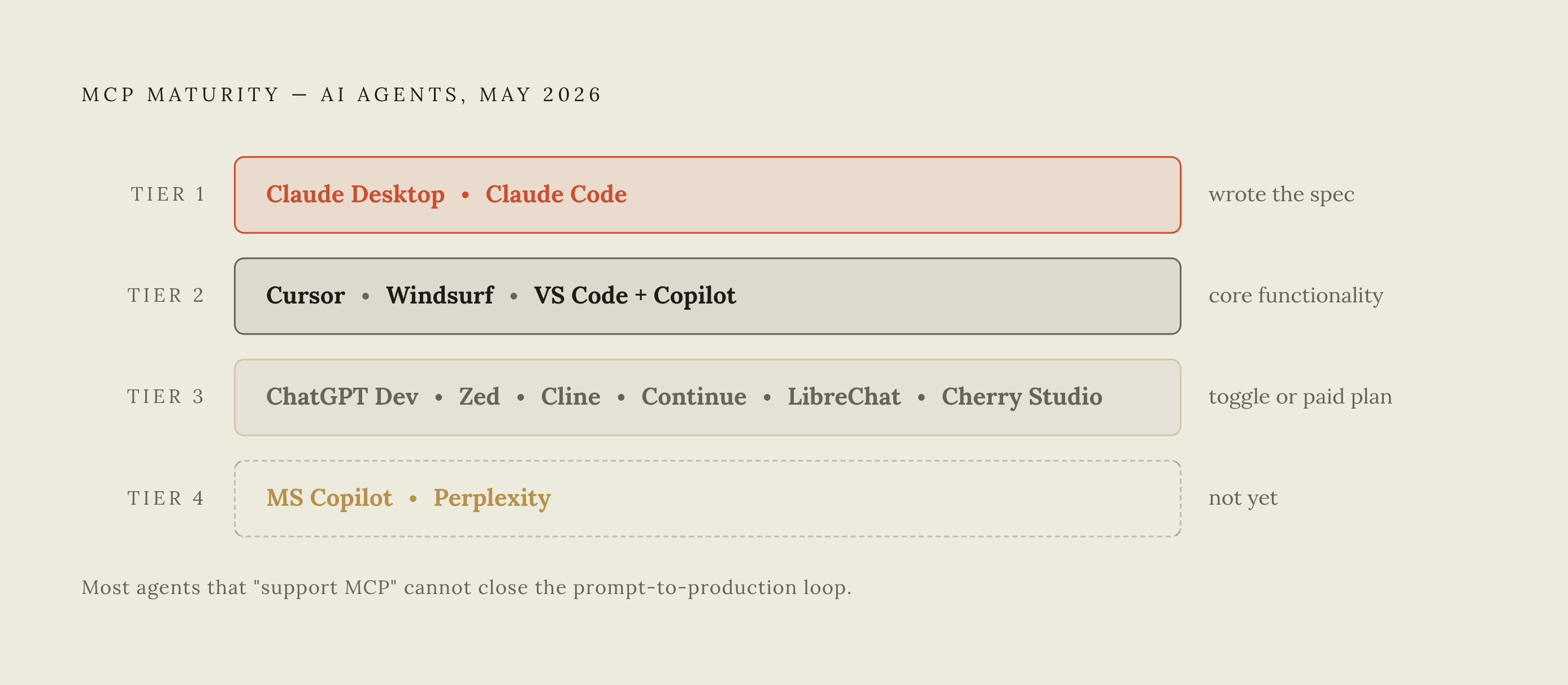
Lining these agents up by MCP maturity, as of May 2026, produces something close to a clean tier list. Claude Desktop sits at the top, built by the team that wrote the spec. Cursor, Windsurf, and VS Code with GitHub Copilot form a strong native tier where MCP counts as core functionality. Behind a toggle or a paid plan sit ChatGPT's Developer Mode, Zed, Cline, Continue, LibreChat, and Cherry Studio. Consumer Microsoft Copilot and Perplexity trail behind, not yet supported or barely there.
The agent's MCP maturity is only half the equation, and most builders get that backwards. The connector on the other end of the wire matters just as much, arguably more. A first-class MCP client wired up to a connector that only reads files still can't deploy anything. Client sophistication doesn't make up for a thin server on the other end, and no amount of polish in Claude's connector panel changes what the server it's talking to can actually do.
What actually matters is which MCP connector provides the full infrastructure stack, backend, database, authentication, hosting, and a domain, as native tool calls the agent can invoke directly. Most people have already picked their AI tool of choice, whether that's Claude or ChatGPT or a development environment built around one, and switching that choice usually isn't necessary or worth the cost.
Because MCP is model-agnostic, a well-built connector works the same when called from Claude, ChatGPT, or Cursor. Nobody has to give up a subscription they already like just to close the deployment gap.
Matching your AI tool to an MCP deployment connector that closes the infrastructure gap
Start with the AI tool already in daily use. If Claude is the driver, look for a connector that installs through the Claude connector directory with OAuth handled natively, no config file involved. If ChatGPT is the tool of choice, confirm the connector meets OpenAI's stricter Developer Mode requirements around OAuth 2.1 and Dynamic Client Registration before assuming it connects cleanly.
From there, run the same three deployment tests against any connector under consideration. Does it work over Streamable HTTP with OAuth 2.1 without needing a bridge package? Can it write to a database and trigger a deployment in the same conversation where the code got generated? And does whatever it provisions still exist, live, reachable by URL, after the conversation ends and the laptop closes?
That gap has a fairly consistent shape across most connectors on the market: backend logic, database storage, user authentication, recurring background tasks, email notifications, search visibility, and hosting that can actually take traffic, and a handful of connectors, Floot (an MCP-based platform that runs inside Claude or ChatGPT and supplies the entire backend, database, and hosting layer so a conversation ends with a live app rather than a pile of code) among them, are built specifically to cover all of it. Generated code checks none of those boxes on its own. A connector that handles all of them, called directly as tool calls from inside the same conversation where the app got built, closes the loop that separates a demo from something a user can actually visit.
One deployment connector built specifically to close that gap, running on the same underlying protocol, sets up through the Claude connector directory with one click. No URL to copy, no config file to hand-edit, no terminal required. It doesn't charge a markup on top of the AI's own token usage; the fee covers the platform infrastructure itself, so builders keep the Claude or ChatGPT subscription they're already paying for. Pricing runs a Free plan with limited features alongside a Pro plan at $25 a month, and as of the most recent count, more than 95,000 users have built over 17,000 apps on it. SEO groundwork ships as part of the deployment: pre-rendering, sitemap.xml, robots.txt, custom domains, canonical URLs, and meta and social preview tags, all handled automatically so an app is discoverable the moment it's live.
If the answer to all three deployment tests is yes, the AI tool matters far less than it seems to at first glance. MCP's model-agnostic design means the same connector keeps working even if the AI provider changes down the line. The infrastructure stays put. Only the front end changes.
The agents that support MCP well stopped being the differentiator they were back in 2024. What separates products now is whether the thing on the other end of that connection can turn a finished prompt into a live app, with a database that persists, a login system that works, and a domain a real user can type into a browser.