AI App Builders That Handle App Store Deployment for You
Four AI app builders now handle App Store deployment automatically for non-technical founders.

AI app builders can publish an app to the App Store and Google Play without a platform-specific computer or Xcode, with only some handling submission and others handing over files. FlutterFlow has direct deployment to both stores, while a0.dev claims one-click publishing that covers the build, App Store Connect listing, and upload.
Why app store deployment is harder than building the app
A working app is not a published app. After the screens and features work, a separate job begins involving signing certificates, provisioning profiles, binary submission, and store listings. Xcode and App Store Connect belong to that process. A founder can finish the product without knowing how to get it through this last stage.
That gap has stopped non-technical founders from launching. Any step can go wrong and leave someone who has never used developer tools unsure what to do next. Earlier AI builders could produce something functional while leaving platform-specific credentials, build settings, and review requirements unresolved. The founder then needed developer help at the point when the app appeared finished. Web publishing is largely solved as a distribution task, but reaching Apple’s and Google’s stores remains a separate technical job.
How can you publish without a Mac or Xcode, and what must the builder handle?
The builder must take on the platform-specific work. For fully handled iOS deployment, that means building the signed binary, managing certificates and provisioning profiles, creating or populating the App Store Connect listing, and uploading the build. A binary is the packaged app submitted to the store. Certificates and profiles are part of the signing work that ties the build to the developer account. In this version of the workflow, the founder reaches the release decision without having to perform those technical steps.
Partial deployment stops somewhere before that point. A platform might build the app but leave certificate management, listing creation, or upload to the founder. The distinction is easy to miss in a claim about “store-ready” output, because a ready file still needs someone to submit it. Android’s upload process is less tied to platform tooling than Apple’s. That makes an iOS submission service paired with an Android file handoff a reasonable offering, but not the same as submission to both stores.
The app’s construction is a separate question. A native app uses technology such as Swift, Java, React Native, or Flutter, while a WebView wrapper displays a web app inside a thin native shell. Both can be packaged for store distribution. They do not offer native API access, push notifications, or offline features on the same terms, and the distinction can affect Apple’s review. “Available in the app stores” therefore describes the product’s distribution destination.
The founder must take care of developer accounts in either case. Apple needs a developer account paid for each year, while Google Play needs a developer account with a one-time registration fee. Those accounts establish ownership of the app. Even when a service handles signing and upload, the founder still has to go through account enrollment and identity verification. The app must also meet the store’s review requirements when a service handles submission.
The four AI app builders that currently reach the app stores and what each one actually does
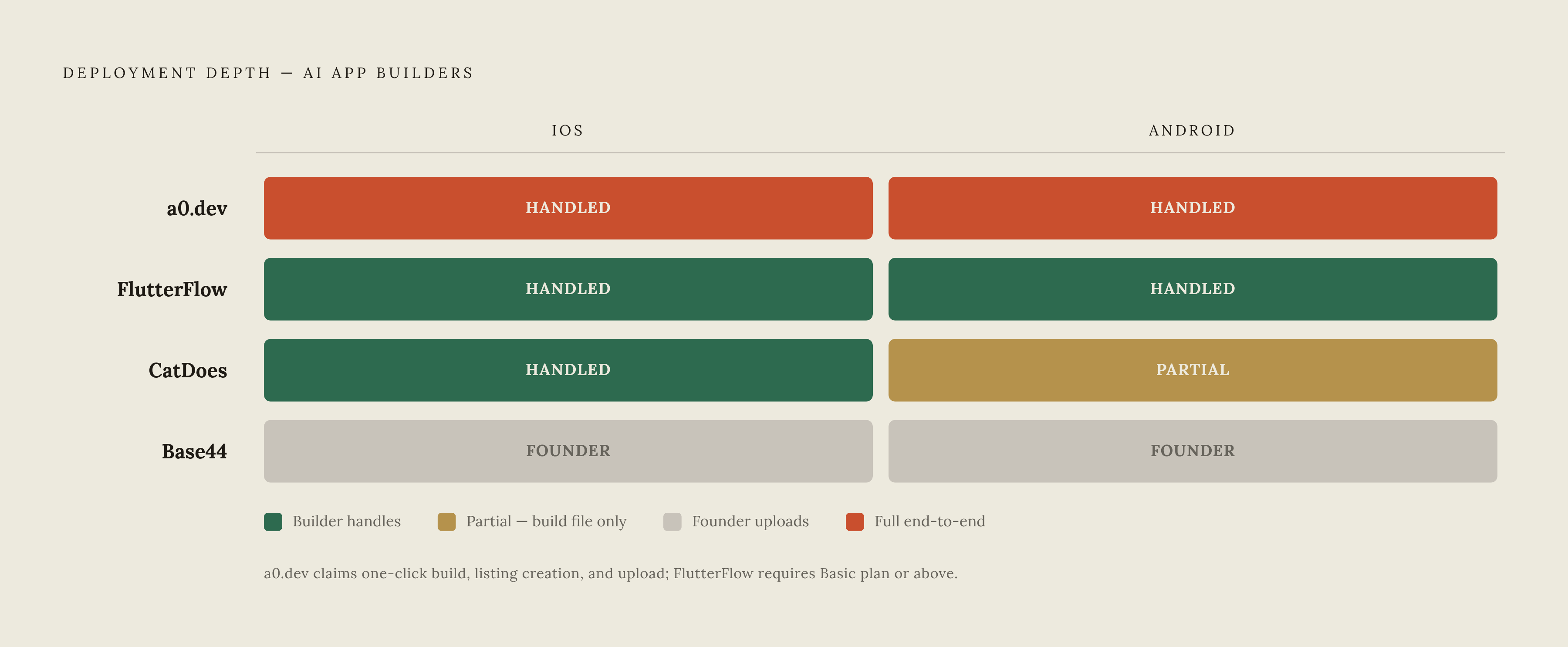
CatDoes builds React Native apps through an AI agent and submits the iOS build to App Store Connect. The founder then releases through TestFlight or publicly from there. Android follows a different route. CatDoes produces a production build, but the founder uploads that file to Google Play. Store submission is included in one of its paid plans, which costs more per month than its web-only plan.
FlutterFlow provides Flutter/Dart code and direct deployment to both the Apple App Store and Google Play on Basic and above. Founders can deploy without having to set up Xcode or Android Studio. The founder still needs the developer accounts required by the stores, but submission happens within the platform. Basic is a monthly subscription plan. The code is also exportable, giving the founder a way to download the project.
a0.dev builds mobile apps through conversation with an AI coding agent. Its site claims one-click publishing to the App Store and Google Play, including the build, App Store Connect listing creation, and upload. Backend support comes through Convex or Supabase, with payments, subscriptions, and an analytics dashboard built in. Developer accounts are still required. Its publishing claim describes more than file generation, though no subscription price is specified here, so the cost comparison cannot be completed on the same basis as the other entries.
Base44 has been able to prepare and package apps for both stores since February 2026. The mobile app it makes runs the published web app inside a native WebView and keeps it as a web app in that shell. The founder handles submission. Base44 generates the files, which the founder uploads using their own Apple and Google developer accounts. The Builder plan is required for store files, although no plan price is specified here.
The code export distinction is separate from submission depth. FlutterFlow’s downloadable code changes what happens if the founder later needs to leave the platform. Most prompt-first non-coders will never use that option themselves. For a business-critical app, however, the ability to hand the code to a developer can change the long-term risk of committing to a builder.
What the deployment spectrum means in practice for a non-technical founder
Someone who has never used App Store Connect may need hours or days to learn it just when they thought they could focus on launch. The subscription price alone does not capture that cost. A cheaper build service can still leave a founder needing technical help, while a service that handles more of the submission can spare them that need.
The split between iOS and Android deserves similar care. That trade-off can work for someone willing to learn how one store works. It is a poorer fit for someone whose requirement is simply to supply developer accounts and approve a release. Both founders can keep the same app idea, but one needs more deployment help than the other.
The strongest objection to an all-in-one builder is dependence on the platform, sometimes combined with the limits of a WebView app. That concern is valid for certain products. An offline-heavy or notification-dependent app has different needs from a simple content or utility app, and camera access, push notifications, and offline storage are not available to a WebView on the same terms. Apple has also been stricter when reviewing wrapped web apps in the past. For many consumer apps, though, unresolved deployment steps can prevent a usable app from launching.
Other options address different parts of this risk. Choicely makes native Swift/Java apps and has an in-house Pro Services team that non-coders can call when AI can do no more. Emergent uses specialized agents to build, test, and deploy web and native mobile apps with React Native and Expo from one workspace, without a separate subscription for each platform. It produces store-ready builds, after which the founder proceeds through TestFlight or the Play Console to release.
Emergent also has GitHub sync on Standard and above, so founders can download the code or hand it to a developer. Leaving through that route can still take work. Human support, code access, and automated submission solve different problems. A founder choosing between them needs to distinguish help finishing the product, help releasing it, and the ability to move it elsewhere later.
Where web-first builders fit — and where Floot operates in this picture
After comparing mobile deployment paths, the natural question is whether the app needs to be native at all. A web app is immediately shareable, requires no installation, and avoids Apple’s review process and in-app purchase commission. That can make it a more appropriate first product. Push notifications, offline use, in-app purchases, and camera-dependent features favor native development, while many other ideas can launch faster and cheaper through a web link. A production-quality web app is not automatically a lesser version of a mobile product.
Backend logic, a database, authentication, hosting, and SEO can remain separate jobs when an AI tool only generates code. Stitching together hosting, database, and authentication services takes engineering time even with AI assistance. The web-first equivalent of handled deployment is therefore a live app with the services it needs.
Floot is an MCP connector that plugs into AI tools such as Claude and ChatGPT and handles that technical stack. It includes the backend, database, authentication, hosted URL, SEO, email notifications, and recurring tasks. Founders work in the AI tool they already use, with no need for a separate build environment, terminal, git, or deployment configuration. Its flat infrastructure pricing is separate from token costs, which founders pay directly to their AI provider.
The web route is not its only deployment path. Floot also publishes native iOS and Android apps from a chat conversation and takes care of certificates and provisioning profiles through the developer accounts the founder owns. For founders choosing its store route, it ships native binaries to both stores without Xcode, Android Studio, or other platform-specific tooling, leaving account activation and release approval to the founder.
How to choose the right deployment path before you start building
The practical decision starts with distribution, before the first build. Does the app need an App Store presence for discovery, credibility, or in-app purchase monetization, or can users reach it through a shareable link? That answer narrows the field quickly. If web distribution is sufficient, a production-quality deployment with authentication, a database, and hosting avoids the Apple annual fee and binary review process. A web-first service such as Floot then belongs in the comparison.
If store presence is required, the next question is what the app must do on the phone. A WebView wrapper may pass review for a simple app, but apps that rely heavily on notifications or work offline have more reason to use native output. CatDoes, Choicely, Emergent, and a0.dev offer native paths worth considering for products beyond simple content or utility apps. FlutterFlow’s Flutter/Dart output provides another route, with direct deployment to both stores.
For each store, check whether the plan handles signing, certificates, listing creation, and upload or stops at a downloadable file. Ask what remains for the founder to do. CatDoes handles iOS submission but hands over the Android build, FlutterFlow deploys to both stores, a0.dev claims one-click publishing, and Base44 leaves uploads to the founder. Plan requirements need checking before commitment because FlutterFlow restructured its plans in September 2025 and platforms update frequently.
What will the subscription cost in addition to developer account fees? Account enrollment also requires time for identity verification, even when the builder handles the technical release work. Before signing up today, choose the required deployment depth and ask the platform to identify every step left to the founder, from the finished app to release in each store.