Connecting Stripe Payments to an App Built With AI
AI builders need to know six moving parts, not just a checkout button.

Stripe moves $1.9 trillion a year through its rails, serving over 5 million businesses. That scale is exactly why founders building apps with AI tools reach for Stripe by default: it's the one their AI assistant already knows how to talk to. Knowing what to ask for still matters more than most builders realize.
Patrick Collison, speaking at Stripe Sessions 2026, described a "parabolic rise" in new businesses launching on Stripe, crediting AI coding tools for collapsing the time between an idea and a monetizable product down to days. More than 88% of the Forbes AI 50 already monetize through Stripe. The AI app builder market itself is projected to grow substantially, expanding at a 36% compound annual rate. A huge wave of non-technical builders are about to plug payments into apps they didn't write a line of code for. What they don't know about that plumbing is the gap this piece is here to close.
What a real Stripe integration contains, before writing a single prompt
Most first-time builders describe a Stripe integration in small terms: a checkout button, a card field, done. That mental model is missing almost everything that actually makes a payment system work.
A production integration has six moving parts, not one:
Checkout flow. The interface that collects payment details, typically through Stripe Checkout or the Payment Element, both of which handle the security burden for you. Webhooks. Stripe's server-to-server event notifications, the only reliable way your app finds out what actually happened on Stripe's end. Database sync. Your app's internal record of who's paid, who's subscribed, and who's lapsed, kept in lockstep with Stripe's own records. Feature gating. The logic that turns access on or off based on live subscription status, not on where the browser happened to land after checkout. Subscription management. Recurring billing, trial periods, cancellations, upgrades and downgrades, each with its own edge cases. Compliance. PCI scope limits and, for European customers, Strong Customer Authentication (SCA).
Stripe's current platform runs on the Payment Intents API, the modern successor to the older Charges API, alongside subscription billing that includes built-in SCA handling. Which generation of that API an AI tool defaults to says a lot about whether the code it hands back is current or stale. None of this requires the builder to write the code personally. But every one of these six pieces needs to live in the builder's head at a conceptual level, because the quality of an AI-generated integration depends entirely on the quality of what gets asked for. Vague requests produce vague, incomplete systems.
The most common mistake AI tools make with Stripe, and why it matters
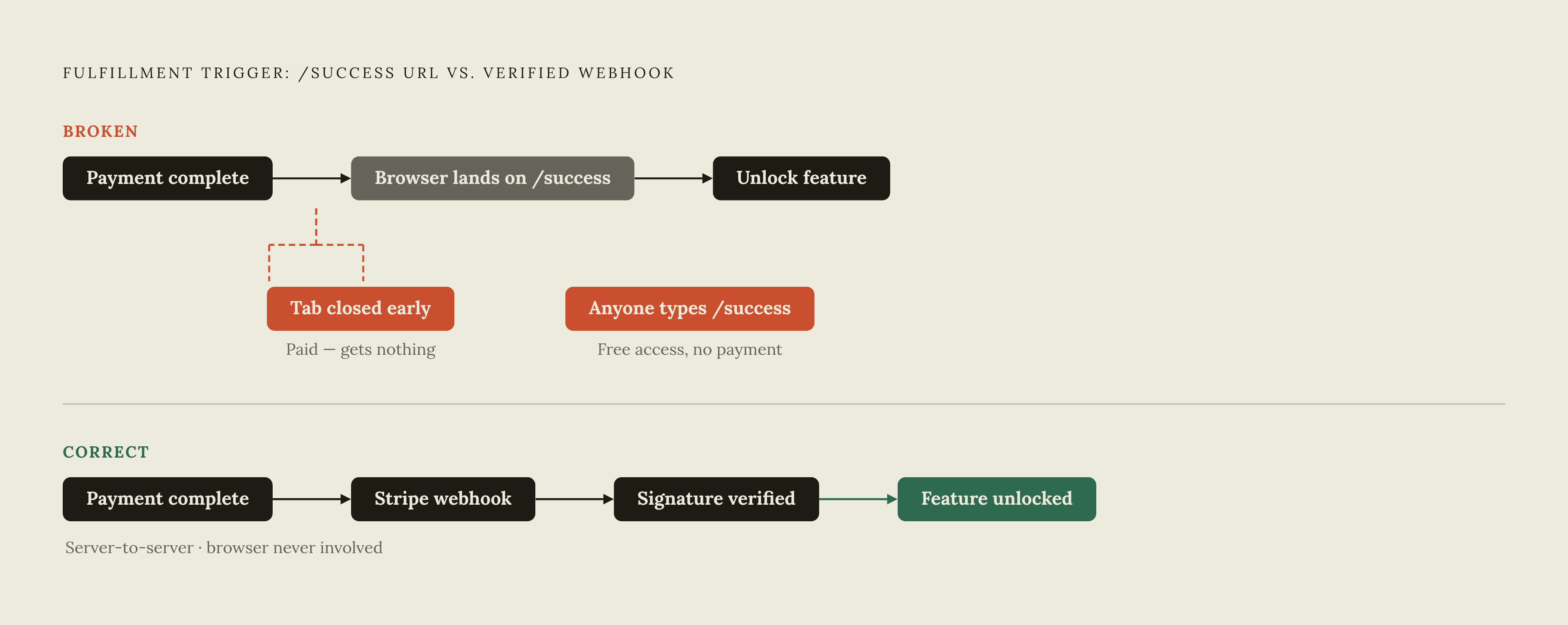
A specific failure pattern shows up repeatedly in AI-generated Stripe code: the redirect fulfillment trap.
The AI wires up checkout, sends the customer to Stripe, and then unlocks the paid feature the moment the browser lands on a /success page after redirect. It looks finished. It demos well. It is, structurally, broken in two directions at once.
First direction: a customer pays, closes the browser tab before the redirect finishes loading, and never actually reaches /success. That customer paid real money and received nothing. Second direction, and worse: because the unlock logic is tied to a URL rather than a payment record, anyone can type /success directly into their browser and get the paid feature for free, no card required.
The fix is to trigger fulfillment from a verified webhook event sent by Stripe directly to your server, completely independent of what the customer's browser does or doesn't do. That's the only fulfillment signal that can't be faked or missed by tab-closing.
Getting webhooks right takes three things, and skipping any one of them reopens the door to fraud or data corruption:
Signature verification, confirming the event genuinely came from Stripe and not from someone hitting your endpoint with a forged POST request. Idempotency: it's safe to process the same event twice without double-charging or double-fulfilling. Retry handling, since Stripe will resend an event if your endpoint fails to acknowledge it the first time.
European cards and SCA: the compliance gap most non-coders never see coming
Strong Customer Authentication, SCA for short, is a European regulatory requirement that adds an extra identity check, a 3D Secure challenge, to a large share of card transactions. It's not optional, and it's not something a builder can quietly skip past.
When an integration doesn't account for it, the payment simply fails. No dramatic error message, no clear signal, just a silent drop. The customer gives up and leaves. The business owner checks their dashboard weeks later, sees conversion is lower than expected for European traffic, and has no idea why. That's the compliance gap: it doesn't announce itself, it just erodes revenue quietly in a way that's almost impossible to diagnose after the fact without knowing SCA exists.
Stripe Checkout handles the SCA challenge automatically, and managed checkout interfaces are built to do the same. Builders should ask for one of those two by name rather than letting an AI tool generate a custom card form from an older code pattern it learned during training. Beyond just handling the challenge when required, Stripe also automatically requests exemptions from SCA where the transaction qualifies for one, so the managed checkout path is doing real compliance work in the background that a hand-built form simply won't replicate.
What Stripe's own AI benchmark revealed about agent capability and limits
Stripe put its own tools to the test. In March 2026, it published a benchmark built specifically to measure whether AI agents can construct complete, production-realistic Stripe integrations from start to finish, not toy demos, actual working systems.
The setup: 11 reproducible environments split across backend-only tasks, full-stack tasks, and a set of "gym" problems covering subscriptions and Checkout configuration. Each environment came with a real codebase, a real database, test-mode Stripe API keys, and automated grading to check whether the resulting integration actually worked.
The results tell a layered story. Claude Opus 4.5 scored a 92% average across four full-stack integration tasks, a strong showing. OpenAI's GPT-5.2 scored 73% across two gym problem sets. Notably, the best-performing runs averaged 63 turns of back-and-forth to get there, underscoring that these are long, iterative builds, not something solved in a single prompt and a single response.
What impressed Stripe: models navigated real user interfaces, debugged live issues as they surfaced, and handled underdocumented edge-case behavior, performing better than expected on all three fronts. What held them back wasn't code generation at all. It was validation: agents could write plausible-looking Stripe code fairly reliably, but consistently struggled to confirm that code actually worked end to end under conditions that resemble production. Writing code and proving it correct turn out to be two very different skills, and the gap between them is exactly where a lot of broken integrations get shipped anyway.
Using the Stripe MCP server with Claude, ChatGPT, or Cursor
Stripe runs its own Model Context Protocol server at mcp.stripe.com, and it changes what "connecting an AI tool to Stripe" actually means. Instead of an AI model guessing at API calls from memory, MCP gives it a standardized way to read and act directly inside a real Stripe account through defined tool calls.
On the read side, an agent connected through MCP can pull customers, charges, PaymentIntents, invoices, subscriptions, payouts, balance information, and disputes. On the write side, it can create customers and invoices and issue refunds. That's a meaningful amount of operational surface area for an AI assistant to touch directly, and authentication matters here as much as capability.
Installation runs through a single command, stripe agent setup, which installs an agent plugin bundling the MCP server together with a set of agent skills, and keeps both updated automatically going forward.
Two authentication paths exist, and they serve different situations:
OAuth, used when a client is acting on behalf of a specific user's Stripe account. API keys, used when an AI application needs independent, persistent access that isn't tied to a single user session.
Picking the wrong one isn't fatal, but it does create friction down the line, particularly for anything meant to run unattended.
How to prompt for a correct Stripe integration rather than a plausible-looking one
The builder's actual job, once an AI is doing the implementation, is specification. That distinction decides whether the output is production-ready or just something that looks finished in a demo and quietly breaks in the first week of real traffic.
For checkout, precision in the prompt matters immediately:
- Name Stripe Checkout or the Payment Element specifically, never just "a card form" or "a payment page."
- Explicitly request that SCA handling be included, don't assume it's implied.
- Ask for test-mode configuration first, and treat the switch to live-mode keys as its own separate, deliberate step.
For webhooks, vague requests produce vague, fragile results. Instead:
- Name the exact events needed for your use case rather than leaving the selection to the AI.
- Require signature verification using the Stripe webhook secret, not code that simply accepts any POST request that shows up at the endpoint.
- Ask explicitly for idempotent handling, so a duplicate event delivery doesn't process the same payment twice.
For database sync, the instruction has to close the redirect fulfillment gap directly: specify that feature access is driven by a payment status field stored in your database and updated server-side, never by which page the browser happens to be on. And ask specifically for logic that accounts for lapsed and failed-payment states in addition to the active state that most generated code defaults to.
What Stripe charges and how pricing works for a new app
Stripe's standard US pricing runs 2.9% plus $0.30 per successful transaction. That's the baseline, but it's not the whole picture for anyone processing international customers.
Two add-ons apply in practice: an additional 1.5% for international cards, and an additional 1% when currency conversion is involved. Stacking both onto an international sale in a foreign currency pushes the effective rate well past the headline number, which matters for anyone modeling margins on a global customer base.
There are no setup fees and no hidden charges baked into the standard tier, costs move in direct proportion to revenue, which is the right shape of pricing for an early-stage product with unpredictable volume. Businesses processing a large volume of transactions annually can negotiate volume discounts, though that's a conversation for a later stage of growth, not something a new app needs to think about on day one.
Choosing the infrastructure layer that handles the rest of the stack
Stripe handles payments. It does not handle the rest of what a real application needs to survive contact with actual users: a database to persist subscription state, authentication to know who's logged in, hosted infrastructure to keep the thing running, transactional email for receipts and failed-payment notices, and the ongoing reliability work of keeping all of it in sync.
One common path for solo builders is stitching several specialized tools together, one for building, one for data storage, one for authentication, one for payments, one for analytics, one for email. A research estimate put the combined cost of a stack like that at under $20 a month before any revenue comes in. That number assumes the builder can correctly configure and then continue maintaining every one of those separate pieces, indefinitely, as each one updates on its own schedule.
Costs on stitched stacks tend to hide, not vanish. A pricing analysis of one comparable no-code platform, FlutterFlow, found that a solo builder's real first-year floor reaches $592, and that's before factoring in database costs like a Supabase Pro plan. The sticker price and the actual bill are two different numbers.
The alternative is a single platform that bundles backend logic, database storage, user authentication, recurring background tasks, transactional email, SEO, and hosting into one plan. That approach trades some flexibility for the removal of an entire category of ongoing maintenance work, which matters most precisely when the person building the app is also the person who has to keep it running. For a solo operator without a dedicated infrastructure team, that trade tends to be the right one.