Setting Up Automated Email Notifications in a No-Code App
Built-in email infrastructure handles triggers, logic, and delivery as one integrated system.

Automated email notifications look simple from the outside: check a box, connect an account, done. That box actually depends on a chain of infrastructure, a trigger, a backend process, and a delivery system, and if any one piece is missing or misconfigured, the email never sends. No error message. No warning. The user just never gets their receipt.
The three infrastructure layers every email notification depends on
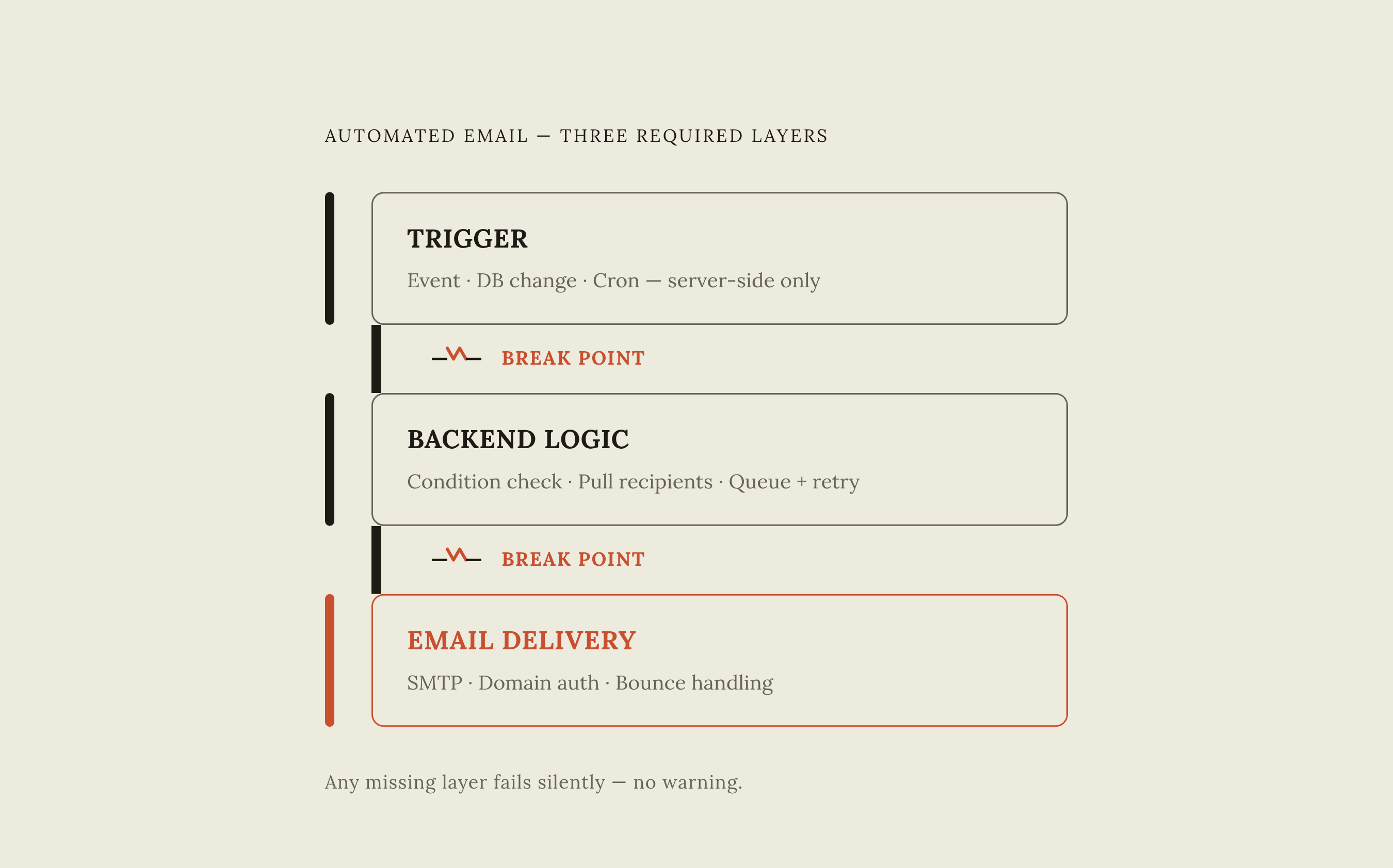
Every email notification that fires reliably rests on three separate layers, and each one has to hold up on its own.
The first is the trigger, the thing that detects something worth notifying someone about. That could be event-based (a form gets submitted, a payment clears, someone signs up), database-event-based (a row gets added or a status field changes), or time-based (a job runs every morning at a set hour, no matter what anyone in the app is doing). The detail that trips up a lot of no-code builds: a trigger has to live on the server. A JavaScript listener sitting in someone's browser tab isn't a trigger in any lasting sense, because it dies the moment that tab closes.
The second layer is backend logic. This layer checks whether the trigger condition actually got met, pulls the right data (who's getting notified, what the message says), and queues the outgoing email so it can retry if the first attempt fails.
The third is email delivery, and it's a different job entirely from the logic layer. This is SMTP, deliverability, bounce handling, and domain authentication. In a stitched-together setup, this usually means paying for a separate transactional email provider. In an all-in-one platform, it might already be bundled in. Skip the domain authentication step, and even a perfectly triggered, perfectly written email ends up in spam.
All three layers have to be present and wired together correctly. A gap anywhere in that chain breaks the whole thing. "Just add email notifications" is advice that sounds complete but isn't.
How scheduled triggers and database events work in practice
Time-based triggers, the cron jobs of the backend world, run on a schedule set in advance. "Every morning at 8am, check who has unread messages and send them a digest," for instance. No user has to open the app, click anything, or even be awake. A cron job fires whether or not anyone's around, and that is why it works so well for the fifty things that used to require someone remembering to hit send.
Most external cron tools work by pinging a URL on the app at the scheduled time. That means the app needs an endpoint sitting out on the public internet, reachable by anyone who finds the address. So that endpoint needs its own authentication, or it becomes an open door.
Database-event triggers work differently. A new row lands in the orders table, and that fires a receipt email. A status field flips to "shipped," and that fires a tracking notification. For this to work, the backend has to be watching the database directly. That's a meaningfully different architecture, and it's the one that holds up when nobody's actively using the app at the moment the event happens.
The reliability question comes down to where the trigger actually lives. A trigger tied to a browser tab, an exposed webhook nobody's monitoring, or a dashboard someone has to remember to check will miss events sooner or later. A trigger running inside the same infrastructure as the database won't.
What a stitched-together email notification stack looks like
Picture the standard pattern for a payment notification, built by connecting a few separate tools. Stripe completes a checkout session. An automation platform like Zapier picks up that event as a trigger. Zapier then either sends the email itself or hands the data off to a connected Gmail or Outlook account. Zapier's Stripe integration supports several trigger events this way: completed checkout sessions, subscription cancellations, failed payments, new completed charges. Once that trigger fires with the payment data attached, a "Send Email" step can pull the order amount and customer name straight into the subject line and body.
That works until volume increases. On free and trial Zapier plans, sending is capped at 5 emails per day; paid plans push that to 10 emails per hour from a zapiermail.com address. Past a handful of notifications a day, that ceiling forces a move to a dedicated transactional email provider.
That's where something like Resend comes in as a standalone delivery layer. It offers tiered pricing that scales with volume. Resend rolled out its own Automations feature in April 2026, adding simple event-triggered sequences inside the service itself. Even so, hooking it up still means creating an account, verifying a domain, managing API keys, and wiring all of it into the app's backend by hand.
The case for stitching tools together like this isn't nothing: each piece is often the best tool available for its one narrow job, and the setup is flexible in ways a single bundled platform sometimes isn't. But flexibility has a price, and it appears later.
The hidden costs that make stitched notification stacks expensive over time
Task-based billing is where the math turns against a stitched stack. Take a six-step lead flow: capture the lead, enrich the data, push it to a CRM, route it to the right person, ping a Slack channel, log it somewhere. Every one of those six steps, on every single run, counts as a task. Running that flow a few thousand times a month turns what looked like a tidy little automation into a $200-plus monthly bill. Layering on premium connectors for tools like Salesforce, HubSpot, or Shopify adds another $20 to $50 a month each. AI-powered steps, introduced in late 2024, tack on roughly $10 more on Professional and above Zapier tiers.
Nothing makes that clearer than the maintenance time. A conservative estimate puts ongoing upkeep, watching for silent failures, remapping fields when an API changes shape, chasing down "this worked fine yesterday" bugs, juggling logins across three or four separate billing dashboards, at 4 to 8 hours a month. Putting any reasonable price on a founder's time adds another $200 to $400 a month that never appears on an invoice but gets spent all the same.
Scale makes this worse, not better. A no-code app serving a few hundred users might run comfortably on a modest starter-tier plan. Pushing that to a few thousand active users, though, can drag monthly costs up to somewhere between $1,500 and $10,000. That pattern isn't unique to one platform; it occurs anywhere pricing is tied to usage rather than a flat rate. The notification stack scales right along with everything else: more users means more trigger events, more automation tasks consumed, more emails sent, more of the bill going up.
There's a subtler risk in all of that, too. When the notification logic lives inside a proprietary automation platform, moving the app to a new home later means rebuilding that entire chain, trigger, logic, delivery, from zero.
What built-in email infrastructure provides that stitching cannot replicate easily
An all-in-one platform that bundles email infrastructure directly gives a founder something a stitched stack has to work hard to fake: transactional email sent straight from the app's own domain, no third-party mail account required. Some platforms go further and support receiving email too, not just sending it, which opens the door to support inboxes, auto-responders, and email-to-ticket workflows. Some all-in-one platforms extend this further with threading and related features.
The real advantage is co-location. When the cron job, the database, the backend logic, and the mail delivery system all run inside the same infrastructure, there's no external handoff sitting between "event happened" and "email sent." A stitched setup, by contrast, has a potential failure point (and often a billing event) at every single handoff between tools.
Data and code ownership matters here too, and it's easy to overlook until it's needed. Some all-in-one platforms offer full code and data export, which means the notification logic isn't locked inside a backend nobody but the platform can touch. That's a safety net a stitched setup spread across four or five vendor accounts can't easily offer, because there's no single place to export from.
None of this is a shortcut to something flimsy. Built-in infrastructure like this is the same stack a developer would piece together by hand, trigger, logic layer, delivery layer, just managed on the founder's behalf instead of assembled one API key at a time.
Setting up an automated email notification in a no-code app: a concrete walkthrough
Take a realistic case: an e-commerce or SaaS app that needs to tell a customer their payment went through.
Step 1: define the trigger. Figure out exactly what event or database change should set off the notification. In a conversational build, working through an MCP connector into an AI assistant, this can be described in plain English: "When a new row gets added to the orders table with status equal to completed, send that user a receipt email." The assistant turns that sentence into a server-side endpoint or a scheduled job that persists independently of any open browser tab.
Step 2: configure the email content. Decide what actually goes in the message, order ID, amount charged, the customer's name, and pull it from the same database the trigger is already watching. Because the trigger and the database sit in the same place, there's no field-mapping step between separate tools, no matching up a "customer_name" column in one system with a "Name" field in another.
Step 3: test the trigger path, not just the template. It's easy to check that the email looks right and stop there. What actually needs testing is whether the trigger fires under real conditions, a real order marked completed, not just a manually sent test message. A notification that looks perfect in preview but never fires on a real event has failed in the way that matters most.
The MCP connector pattern and what it changes for non-technical founders
MCP connectors let an AI assistant, Claude, ChatGPT, or a tool like Cursor, reach past its own chat window and take real actions in outside systems. There are two ways this gets set up: a local connection through stdio, usually an npm package dropped into a config file, or a remote connection over HTTP, where a URL gets pasted into the assistant's connector settings. Same underlying protocol, two different setup paths. Some AI clients support streamlined installs for connectors from their own directories; other clients typically need a server URL plus OAuth.
Applied to notification logic, this changes the whole shape of what a non-technical founder can build alone. The founder describes the trigger and the email content in plain language, inside the same assistant session already being used to build the rest of the app. The assistant writes the backend endpoint, sets up or queries the database, and deploys it, and the founder never has to open a terminal window.
The pricing shape here matters too. Token costs get billed by Anthropic or OpenAI directly, at their own rates, while the connector platform charges separately for infrastructure, actions taken, hosting, that kind of thing, not for the AI reasoning itself. For a notification-heavy app sending hundreds or thousands of emails a month, that separation means the cost of building the thing doesn't compound with the cost of running it.